
Talk to sales Contact Login English

Square Pricing Breakdown: Fees & Hidden Costs (2026)

Content

Square often appears to be the simplest POS option on the market. One app, transparent rates, and a promise of no monthly commitment.

In reality, your Square POS cost comes from payment processing fees, per-transaction charges, hardware purchases, and add-ons that quietly increase your total spend over time.

As more restaurants rely on digital payments and POS software to run daily operations, even small differences in pricing and processing fees can directly impact already tight margins. 

In this guide, I’ll break down what you actually pay for with Square, where the hidden fees hide, and how to keep your costs under control in 2026.

Key Takeaways

  • Processing fees drive the real cost: With Square, the largest expense is usually the per-transaction payment processing fee, not the software, which can push total costs well beyond what most operators expect from a “simple” POS.
  • Hardware is an upfront investment: Square hardware is not free. Card readers, Square Register, and additional devices typically cost from $50 to $1,800 per unit, and scaling your setup increases replacement and upgrade costs over time.
  • Free software still grows expensive: Square’s free plan covers basic needs, but features like an online ordering system, loyalty, payroll, and advanced reporting add monthly fees that can easily raise your bill by $100–$300 per month.
  • Small fees add up quietly: Chargebacks, instant deposit fees, add-on service costs, and higher rates for manual card entry or online payments often appear only after you start using the system at scale.
  • Monthly totals depend on volume and setup: Small cafés and food trucks often land around $250–$600 per month, while busy full-service restaurants or multiple locations can exceed $900–$1,500 per month once processing, hardware, and add-ons are included.

What Square Pricing Looks Like in 2026

Square pricing is built from several moving parts, not a single flat fee. Your total Square POS cost depends on how you accept payments, which hardware you use, and how many additional tools you activate over time.

Square’s free software lowers the entry barrier, but most restaurants quickly discover that payment processing fees shape the real cost of using the platform. 

As sales grow, per-transaction charges often become the largest ongoing expense, especially for busy locations with high card volume.
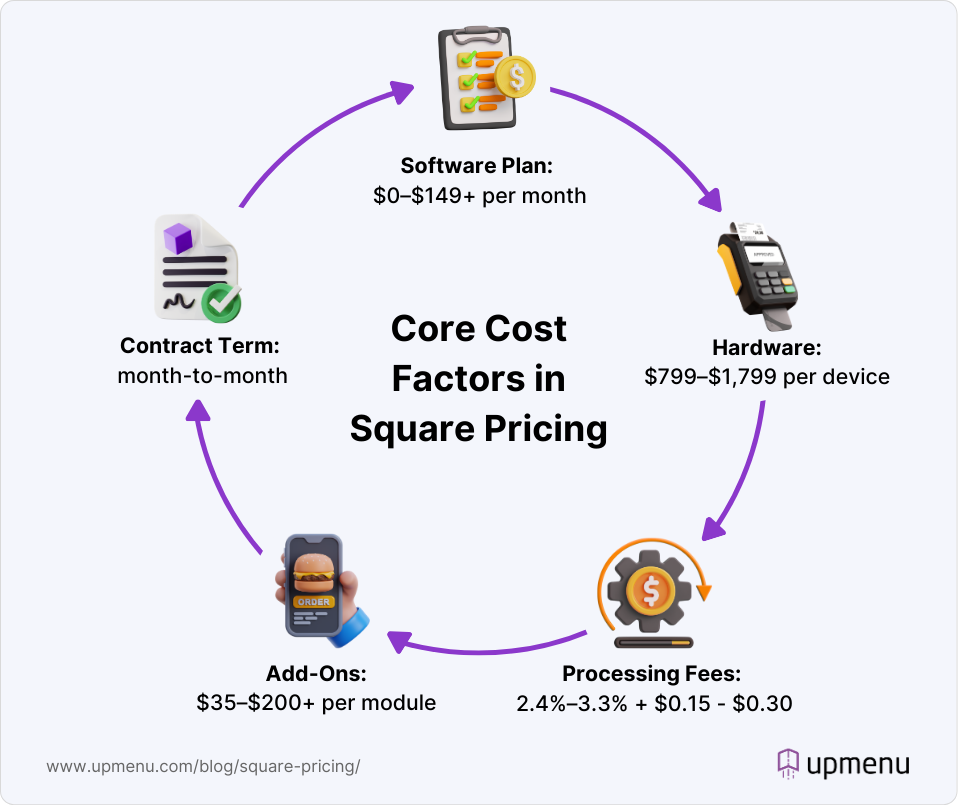
Infographic explaining main cost factors of Square pricing

Many of Square’s operational features live outside the core POS. Tools like online ordering, loyalty programs, payroll, and marketing are priced separately, so monthly costs vary widely across restaurants using the same POS setup.

One of our clients, who runs a fast-casual restaurant in Denver, kept Square strictly for in-person payments and shifted online ordering and loyalty to UpMenu. With their average monthly volume, this change lowered software and add-on costs by about $150–$200 per month compared to using Square’s built-in tools.

Combining Square for payments with external tools for digital ordering and marketing is the most practical way to keep POS costs under control without rebuilding the entire tech stack.

Square POS Plans & Monthly Software Costs

Square’s pricing model differs from many traditional POS systems. Instead of locking you into one core plan, Square combines a free POS with optional paid tools and transaction-based fees. 

That makes the entry point feel simple, but your real cost depends on how you accept payments and which features you add on.

Below is a clear breakdown of the most common Square plans and how restaurants typically use them.

PlanMonthly software feeTypical processing fees*Best for
Square Free$0/month2.6% + $0.15 in-person transaction and 3.3% + $0.30 for online payments.Small cafés, food trucks, single-terminal setups.
Square Plus$49 per location/month2.5% + $0.15 in-person transaction and 2.9% + $0.30 for online payments.Growing restaurants, higher volume locations, and advanced inventory needs.
Square Premium$149 per location/month2.4% + $0.15 in-person transaction and 2.9% + $0.30 for online payments.Full-service restaurants, busy locations, deeper reporting needs.
Square ProQuote-basedCustom pricing negotiated by volume and setup.Multi-location restaurants and high-volume operators.

*Sources: Square Pricing, Square POS Pricing, Square Pricing Guide, Square Overview

Square Free Plan

Square’s free plan gives you access to the core point-of-sale software with no monthly fees. This makes it appealing if you want to keep fixed costs low, especially in the early stages of your business.

The trade-off comes through processing fees charged on every transaction. For low-volume cafés or food trucks, this model often works well. As card sales increase, processing fees quickly become the largest monthly expense. 

Hardware is also not included, so you still need to purchase a card reader or Square Register to accept payments.

Square Plus Plan

Square Plus is priced at $49 per location per month and includes features such as advanced inventory tools, team management, and sales trend reporting. Processing rates stay the same, but the monthly fee gives you more operational control as volume grows.

This plan works best for restaurants that want better visibility into performance without committing to a complex POS contract. 

Hardware costs remain separate, and additional tools such as loyalty or online ordering are billed on top.

Square Premium Plans

The Square Premium plan costs $149 per location per month and is built for restaurants with higher order volume or more complex daily operations. It adds deeper reporting and more advanced inventory and team management tools compared to Square Plus.

Processing rates are slightly lower, which can help busy locations reduce payment processing fees over time. Hardware, online ordering, loyalty, payroll, and other add-ons are still billed separately.

This plan fits full-service restaurants and high-traffic locations that need better visibility into performance but don’t require fully custom enterprise pricing.

Square Pro Plans

Square Pro plans are built for high-volume operators and restaurants with multiple locations. Pricing is customized based on business needs, transaction volume, and feature requirements.

This setup can unlock lower processing rates, but it also introduces more complexity. 

You’ll need to carefully review the quote and factor in software fees, processing, Square hardware, and paid add-ons to understand your true monthly cost.

Square Hardware Costs

Square hardware is one of the biggest one-time expenses you’ll face when setting up a Square POS system. Even with Square’s free plan, you still need to purchase hardware to accept payments in person and run daily operations.

Most restaurant owners feel the real hardware costs once they add more devices. A second register, an additional card reader, Square Register, or a self-service kiosk quickly raises the upfront investment. 

This matters even more for busy locations and multiple locations where hardware needs scale with volume.

Infographic showcasing Square hardware

Based on our POS system cost guide, restaurant hardware typically starts around $600–$1,000+ per terminal, depending on setup. That aligns closely with Square hardware pricing today.

Below is a simple breakdown of common Square hardware and what you can expect to pay.

HardwareTypical 2026 Price*Notes
Square Register$799–$1,799All-in-one POS, customer-facing display included
Square Terminal$299–$329Portable countertop device, built-in card reader
Square Reader (Contactless & Chip)$49–$59Basic card reader for tap, dip, or swipe
Square Stand (iPad-based)$149–$199iPad not included
Kitchen Display Screen (Square KDS app)$300–$900Requires a compatible tablet and mount
Self-Service Kiosk (Square Kiosk app)$1,200–$2,000+Requires dedicated hardware and kiosk software
Receipt Printers$200–$350Additional units increase total hardware costs

*Sources: Square Pricing, Square POS Pricing, Square Pricing Guide, Square Overview

Keeping the hardware setup lean is the easiest way to control Square pricing early on. 

Starting with a single Square Register or card reader and expanding only when volume justifies it, helps avoid unnecessary hardware costs while still supporting in-person transactions efficiently.

Square Payment Processing Fees & Extra Charges

Payment processing directly impacts your restaurant’s profit margins, and with Square, most long-term costs arise from this. Even though Square’s free plan removes monthly software fees, a large share of your Square pricing is driven by card volume and how customers pay.

Square uses its own payment processing across all plans, so your pricing structure scales directly with revenue. 

For restaurants handling high in-person volume, card-on-file transactions, or growing online orders, processing fees often exceed the combined hardware and monthly fees, especially across multiple locations.

Standard & Custom Processing Rates

Square applies standard processing rates by default, with custom pricing available for higher volume businesses and Square Premium plans.

Typical Square processing rates include:

  • In-person transactions around 2.6% + $0.15 per transaction
  • Online payments and invoices start from 3.3% + $0.30 per transaction
  • Manual card entry or virtual terminal payments also have higher rates due to increased risk

Custom pricing is offered to larger restaurants with consistent volume and predictable card sales. While this can reduce rates, you still need to factor in how processing interacts with paid tools and monthly fees across your Square POS setup.

Additional & Hidden Fees

Square pricing also includes additional fees that many restaurant owners overlook early on. The most common include:

  • Chargeback and dispute handling fees
  • Instant deposit fees for faster payouts
  • Higher rates for online orders, Square Online, and keyed-in transactions
  • Fees tied to Square Loyalty, Square Payroll, and text message marketing usage
  • Additional costs for self-service kiosks, Square KDS app setups, and expanded hardware

These fees often surface only after a restaurant grows beyond basic usage. 

I see this most often with single-location restaurants that start on Square’s free plan, then add online ordering, loyalty programs, menu management, and payroll, only to find their monthly POS cost far higher than expected.

The safest way to control Square pricing is to estimate your annual payment processing volume upfront and match it to the right plan and feature set before investing in hardware or add-ons. 

Add-Ons & Extra Modules

Square pricing remains flexible at its core, but monthly costs increase as you add more tools. Many restaurant owners like Square because there’s no forced bundle, yet that flexibility also means features are priced separately. 

Over time, add-ons often become the second biggest cost after processing fees. This is where a hybrid setup with UpMenu often makes sense. 

Many restaurant owners keep Square POS for in-person payments, then use UpMenu for online ordering, loyalty, delivery, and restaurant marketing tools at a lower flat monthly cost, without changing their Square account or payment flow.

To give you a realistic view of Square add-on pricing, here are common tools restaurants activate and what they typically cost:

  • Square Loyalty: from $45 per month, based on visit volume
  • Square Payroll: from $35 per month plus $6 per employee
  • Square Marketing: from $15–$35 per month, depending on contact list size
  • Square Online: included at a basic level, with paid upgrades for custom domains and advanced features
  • Square Kiosk app: additional monthly fees plus dedicated hardware

Online Ordering & Delivery Tools

Square Online allows restaurants to launch an online store, but advanced features come with additional monthly fees and higher per-transaction processing rates. 

Restaurants using Square for delivery or pickup often see costs increase as order volume grows, especially across multiple locations.

Online Ordering System
Start selling food online
Set up commission-free ordering for your restaurant's website in minutes. Boost revenue while saving on third-party fees

Numerous single-location restaurants and food trucks move their digital ordering to UpMenu to reduce software costs while still accepting in-person payments through Square.

Loyalty, Rewards & Marketing

Square Loyalty, email campaigns, and text message marketing are billed as separate tools. 

As your customer list grows, monthly fees increase, and higher order volume means you also pay more in processing fees per transaction.

UpMenu bundles loyalty, marketing, and customer engagement into one predictable monthly fee, helping restaurants control costs while keeping their Square POS setup unchanged.

Inventory, Menu Management & Reporting

Square includes basic inventory tools, but more advanced menu management, reporting, and sales trends insights are tied to Square Plus and Square Premium plans. 

As you add features and registers, monthly fees rise quickly.

Restaurateurs often notice higher costs once they rely more heavily on detailed restaurant analytics or need better visibility across locations.

Payroll & Team Management

Square Payroll is priced separately from POS software and scales with employee count. Adding more staff, more locations, or full service payroll features can significantly increase monthly fees.

Before committing, it’s worth reviewing how payroll, scheduling, and POS software costs combine, since these tools can push your total Square pricing well beyond the base plan.

Hidden Costs, Contract Terms & What Most Restaurants Miss

Square’s fee structure is simple on the surface, but many owners discover the true cost only after they start scaling operations. Reviews on pricing platforms show a common pattern: low entry costs followed by higher fees once add-ons and processing volume increase.

Every Square account ties you to its payment processing fees on every transaction, which means your real Square POS cost depends on in-person sales, online order mix, and how many extra tools you activate over time. 

Some of the most frequently reported extra charges from real users include:

  • High processing fees on online orders compared to in-person tap, dip, or swipe rates (especially noticeable for low ticket averages).
  • Fees for nearly every additional feature beyond the free core POS, according to multiple user reviews.
  • Chargeback and dispute fees that appear with customer refunds.
  • Instant deposit fees for faster access to funds.
Quote

“While Square is a great tool overall, some of the extra features come with extra costs, and those can add up quicker than you’d expect. It would be nice if more features were included in the base price—especially for small businesses trying to stay on budget.”

Satpal S. (Source: G2)

Many operators misjudge their ongoing cost by focusing only on the advertised “free” plan or low monthly software fees. 

To avoid surprises, it’s best to estimate your expected card sales, online order mix, and add-on usage before settling on a setup.

Real Square Pricing Scenarios 

Here’s what Square pricing can look like in real life once you combine software (if you choose paid plans), payment processing fees, hardware, and add-ons. 

These are ranges, not official quotes, but they line up with what owners and operators report in reviews and forums.

ScenarioTypical setupSoftware + add ons*Payment processing estimate*
Small café / food truck1 terminal, Starter Kit, or basic point of sale plan, some online ordering$100–$300$200–$400
Full-service restaurant2–3 terminals, handheld POS, online ordering, loyalty programs, and inventory management$400–$800$600–$1,200
Multi-location groupMultiple locations, custom pricing, Toast payroll, and team management tools$1,000–$2,500+ (across sites)$2,000–$5,000+

Real users often report that processing fees become the highest ongoing cost as transaction volume increases. 

One Reddit poster noted that Square’s advertised 2.6% + $0.15 per transaction on the free plan effectively feels higher in practice, especially when additional tools like kitchen display systems, payroll, or loyalty programs are added — and these tools do add up fast in monthly fees and processing volume.

The biggest levers to control your pricing are keeping add-ons limited to what you truly need, choosing the right plan before expanding, and managing payment processing volume through average ticket size and mix of in-person versus online orders.

Frequently Asked Questions (FAQ)

For a small café or food truck, Square typically costs $250–$600 per month, including payment processing and basic add-ons.

A full-service restaurant usually pays $900–$1,500+ per month, depending on transaction volume, hardware, and tools like loyalty, payroll, or online ordering.

Square’s published processing fees generally fall within these ranges:

  • In person transactions: about 2.4%–2.6% + $0.10–$0.15 per transaction
  • Online or keyed-in payments: typically 2.9%–3.3% + $0.30 per transaction

These rates sit near the upper end of the typical market range for restaurant payment processing.

Yes. Common extra costs include:

  • Chargeback and dispute fees
  • Instant deposit fees for faster payouts
  • Higher rates for online, keyed-in, or virtual terminal payments
  • Monthly fees for add-ons like Square Loyalty, Square Payroll, Square Marketing, and kiosk tools

These charges sit on top of software and hardware costs and can significantly increase your total Square pricing over time.

Picture of Dominik Bartoszek

Dominik Bartoszek

8+ years Digital Marketer driven by data & AI. Helping restaurants grow more through online orders.

How helpful was this post?

Share this article

Try for free,
no commitment!

Ready to take the next step for your restaurant business?
Schedule a Demo Today! 🚀