
Clover looks flexible on the surface. You choose your clover pos hardware, pick a software plan, and start accepting credit card payments. But once you add payment processing fees, monthly software costs, and optional tools, the real monthly cost is rarely as simple as it first appears.
This matters because the typical restaurant profit margin is as low as 2–6%, which means even small differences in processing fees or POS subscriptions can directly affect profitability. When pricing is unclear, those costs tend to grow quietly in the background.
In this guide, I break down Clover POS pricing for 2026, including hardware, software, processing, and the hidden fees most restaurants only notice after they scale.
Key Takeaways
- Processing fees drive the most costs: With the Clover POS system, most of what you pay comes from processing fees, not the software. Typical credit card processing rates land around 2.3%–3.5% plus $0.10 per transaction, depending on how customers pay and which processor you use.
- Hardware is a real upfront expense: Clover hardware is never free. Devices like Clover Station Solo, Clover Station Duo, and Clover Flex typically cost $500–$1,800 per device, and full restaurant setups often exceed $2,000–$4,000 once peripherals are added.
- Software plans include fixed monthly fees: Clover does not offer a true restaurant-free plan. Most software plans start at $14–$29 per device per month and scale up to $69–$89+ for advanced features like inventory management and employee management.
- Small fees often go unnoticed: Hidden fees frequently come from early termination fees, restaurant mobile app subscriptions, hardware leases, and reseller contracts, which can quietly increase monthly fees over time.
- Monthly totals depend on volume and setup: Small cafés and food trucks often land around $300–$700 per month, while busy full-service restaurants commonly exceed $1,000–$1,800 per month once processing, software, and add-ons are included.
What Clover Pricing Looks Like in 2026
Clover POS pricing does not work as a single number you can budget once and forget.
In my experience, the real pricing comes from three areas: how you process payments, how much hardware you deploy, and which software features you rely on month after month.
What surprises most restaurant owners is that software is rarely the biggest line item. Payment processing quickly becomes the dominant cost as card volume increases.
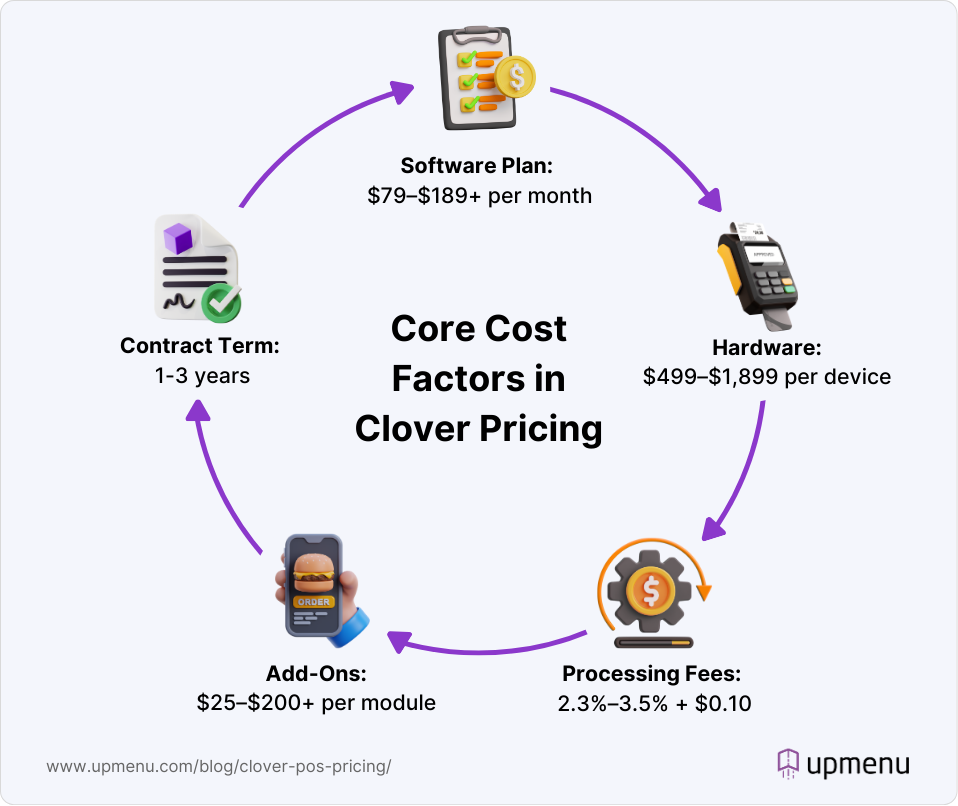
Clover also separates many day-to-day restaurant tools from the core point-of-sale system. Features like online orders, employee management, restaurant loyalty programs, and appointment booking are tied to higher pricing tiers or paid apps.
That is why two restaurants using the same Clover POS system can end up with very different monthly totals.
I had many discussions with small business owners and resellers about disclosures. Restaurants using Clover often report that software fees feel manageable at first, but total costs rise once online ordering, loyalty apps, and advanced reporting are added.
Several operators note monthly increases of $100–$300 after moving beyond a basic setup, even without changing hardware or transaction volume.
For many restaurateurs, the most effective way to control costs is to treat Clover primarily as a payment processor and in-store POS, while keeping online ordering system, marketing, and loyalty outside the Clover ecosystem.
That approach helps stabilize monthly fees without forcing a full system change or disrupting front-of-house operations.
Clover POS Plans & Monthly Software Costs
Clover structures its restaurant pricing around bundled plans that combine software with specific hardware setups.
Instead of a free POS with optional upgrades, Clover pushes restaurants toward predefined packages designed for different service models. That makes pricing easier to compare upfront, but less flexible once your needs change.
Your actual Clover pricing depends on which restaurant plan you choose, whether you subscribe or purchase hardware outright, and how much you rely on features such as online ordering, table service, and employee management.
Below is a breakdown of the current Clover restaurant plans and how they are typically used.
| Plan | Monthly software fee* | Processing fees | Best for |
|---|---|---|---|
| Starter | $79/month | 2.3% + $0.10 in person 3.5% + $0.10 keyed in | Small restaurants, counter service, basic POS needs |
| Standard | $149/month | 2.3% + $0.10 in person 3.5% + $0.10 keyed in | Growing service restaurants using handhelds |
| Advanced | $189/month | 2.3% + $0.10 in person 3.5% + $0.10 keyed in | Full-service restaurants with table service and reporting |
*Sources: Clover POS Pricing, Clover Pricing Guide, Toast vs. Clover
Starter Plan
The Starter plan is Clover’s entry point for restaurants. At $79 per month, it covers core point-of-sale functionality, basic order management, and standard reporting. This plan is commonly paired with a single Clover Station Solo or Flex device.
It works for small restaurants that mainly process in-person payments and do not need table mapping or advanced analytics.
Processing fees apply to every transaction, so as volume grows, monthly costs rise quickly even without upgrading plans.
Standard Plan
The Standard plan costs $149 per month and is aimed at restaurants that need more flexibility on the floor.
It adds support for mobile POS, improved order flow, and more detailed reporting compared to Starter.
This is the tier where many service restaurants land once they introduce tableside ordering, tipping, or multiple staff devices. Software costs are predictable, but total spend still scales with credit card volume and additional hardware.
Advanced Plan
The Advanced plan is priced at $189 per month and is built for full-service operations that rely on table service, deeper reporting, and higher order volume. It supports more complex workflows and is often paired with multiple Clover Station devices and handhelds.
For busy dining rooms, this plan offers better operational visibility, but it also comes with higher fixed monthly fees and the same transaction-based processing fees as lower tiers.
Clover Hardware Costs
Hardware is one of the highest upfront costs when setting up a pos system. Even on the lowest restaurant plan, you need at least one device to accept in-person credit card payments, which means paying for hardware before your first sale.
The real cost shows up when you add more Clover devices.
A second clover station, handhelds for tableside service, or a kitchen display system can quickly raise the total investment, especially for full-service restaurants and multi-location setups where hardware scales with staff and service flow.
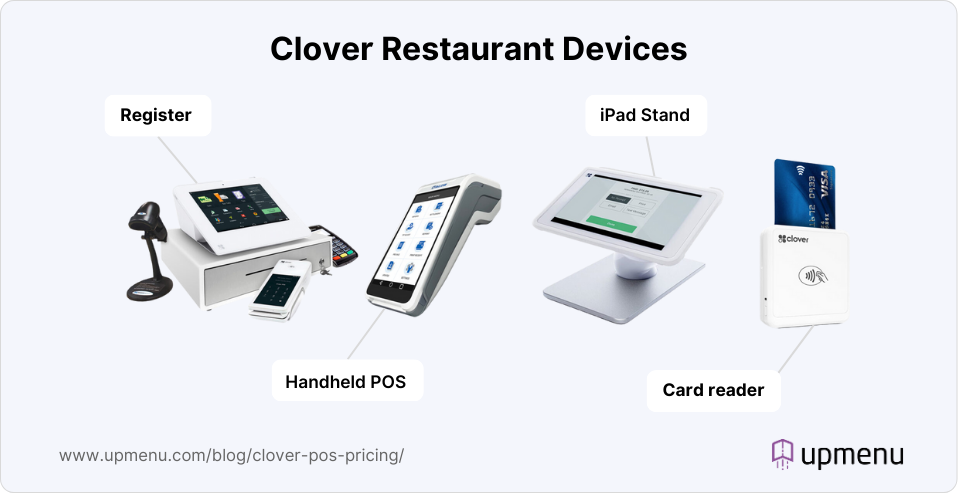
Based on real setups I see most often, restaurant POS hardware with Clover typically starts at $700–$1,200 per terminal, depending on the device and accessories. That range aligns closely with Clover’s current hardware pricing.
Below is a practical breakdown of the most common Clover devices used in restaurants and what you can expect to pay in 2026.
| Hardware | Typical 2026 Price* | Notes |
|---|---|---|
| Clover Station Solo | $1,399–$1,799 | All-in-one POS with built-in receipt printer |
| Clover Station Duo | $1,599–$1,899 | Dual-screen POS for the cashier and the customer |
| Clover Flex | $499–$699 | Handheld POS for tableside ordering and payments |
| Clover Mini | $699–$899 | Compact countertop POS for small service areas |
| Receipt Printers | $200–$350 | Required for most full-service setups |
| Kitchen Display System | $300–$900 | Requires a compatible display and mounting |
| Cash Drawer | $150–$250 | Optional but common in cash-heavy locations |
*Sources: Clover POS Pricing, Clover Pricing Guide, Toast vs. Clover
*Prices reflect Clover MSRP and common reseller ranges. Hardware may be discounted or bundled with long-term contracts.
Keeping your hardware setup lean is the easiest way to control clover fees early on.
Starting with a single clover station and adding handhelds or extra terminals only when service volume justifies it, helps avoid overspending while still supporting smooth in-person payments and operations.
Clover Payment Processing Fees & Extra Charges
Restaurant payment processing has the greatest impact on your margins and becomes the dominant long-term cost. Even when monthly fees feel manageable, total spend is largely driven by card volume and how guests choose to pay.
Clover uses its own payment processing across restaurant plans, which means your costs scale directly with sales.
For locations handling high in-person volume, running online orders, or storing cards on file, processing fees often outweigh software and hardware costs over time, especially once you operate more than one terminal or location.
Standard & Custom Processing Rates
Clover applies standard processing rates by default, with custom pricing available for higher-volume restaurants and negotiated contracts.
Typical Clover processing rates include:
- In-person transactions: around 2.3% + $0.10 per transaction
- Online, keyed-in, or card-not-present payments: typically 3.5% + $0.10
- Manual entry and virtual terminal payments: higher risk rates apply
Larger restaurants with predictable volume may qualify for custom rates, but those savings need to be weighed against software subscriptions, app fees, and hardware commitments tied to Clover.
Additional & Hidden Fees
Clover pricing also includes extra charges that many restaurant owners overlook early on, including:
- Chargeback and dispute fees
- Instant deposit fees (commonly around 1.75%)
- Higher rates for online orders and keyed-in payments
- Monthly fees for apps tied to employee management, loyalty programs, and reporting
- Added costs for kitchen displays, handhelds, and expanded pos hardware
These costs usually appear once a restaurant moves beyond a basic setup. I see this most often with single-location restaurants that start small, then add online ordering, loyalty tools, and more staff devices, only to realize their total monthly cost is much higher than expected.
The safest way to control clover fees is to estimate your annual payment processing volume upfront. Then, choose a plan and feature set that fits your service model before committing to add-ons or additional hardware.
Add-Ons & Extra Modules
Many restaurant owners appreciate that Clover offers modular tools, but that also means features are split across plans and paid apps rather than bundled into one predictable price.
Over time, add-ons often become the second biggest cost after payment processing fees. This is where many restaurants start looking for a hybrid setup. A common approach is to keep Clover POS for in-store payments while using external tools for online ordering, loyalty, and marketing to keep monthly fees under control.
To give you a realistic picture, here are the most common Clover add-ons restaurants activate and what they typically cost.
Common Clover add-ons and pricing:
- Loyalty program: usually $25–$70 per month, depending on the app and customer volume
- Employee management and scheduling apps: around $10–$30 per month
- Marketing and email tools: typically $15–$40 per month, based on contact list size
- Online ordering apps: often $20–$50 per month, plus higher processing rates
- Kitchen display system and advanced order routing: may require paid apps and additional hardware
Online Ordering & Delivery Tools
Clover supports online ordering through third-party apps rather than a native, all-in-one solution. While this gives restaurants flexibility, it also introduces extra monthly fees and higher processing rates for card-not-present transactions.
Restaurants offering pickup or delivery often see costs rise as order volume grows, especially when managing multiple locations or menus through separate apps.
Loyalty, Rewards & Marketing
Loyalty programs, email campaigns, and customer messaging are not fully included in Clover’s base plans.
As your guest list grows, subscription fees increase, and every redeemed reward still runs through credit card processing, adding to total spend.
This is one reason many restaurants prefer keeping loyalty and marketing tools outside their Clover system, where costs are easier to predict month to month.
Inventory, Menu Management & Reporting
Clover includes basic inventory tracking, but more advanced menu control, reporting, and sales insights usually require higher-tier plans or paid apps.
As you add devices and features, monthly fees increase quickly. Restaurants often notice the jump in cost once they rely more heavily on detailed reporting or need clearer visibility across service periods and locations.
Payroll & Team Management
Payroll and full staff management are not part of Clover’s core POS offering. Payroll integrations are priced separately and scale with employee count, which can significantly raise costs for growing teams or multi-location operators.
Before committing, it’s worth looking at how payroll, scheduling, and POS system software fees stack together, since these tools can push total Clover pricing well beyond the base subscription.
Hidden Costs, Contract Terms & What Most Restaurants Miss
Reviews and reseller disclosures show a familiar pattern: manageable entry pricing that steadily increases as transaction volume rises and more features are added.
Your real monthly cost depends on the balance between in-person payments, online orders, and how many paid apps or higher-tier plans you rely on over time.
Some of the most commonly reported extra costs from real Clover users include:
- Higher processing fees for online, keyed-in, or card-not-present transactions compared to in-store payments
- Monthly charges for features that feel essential, such as loyalty programs, advanced reporting, or employee tools
- Chargeback and dispute fees tied to refunds or customer complaints
- Instant deposit fees for faster access to funds
- Long-term contracts or early termination fees, especially when hardware is bundled or leased through resellers
“The biggest headache? Third-party resellers. Depending on who you buy Clover through, you might get hit with hidden fees, long-term contracts, or crazy cancellation penalties.”
Jessica D. (Source: G2)
Many operators misjudge their ongoing cost by focusing only on the advertised “free” plan or low monthly software fees.
To avoid surprises, it’s best to estimate your expected card sales, online order mix, and add-on usage before settling on a setup.
Real Clover Pricing Scenarios
Here’s what Clover POS pricing often looks like in real restaurant setups, once you factor in software plans, payment processing fees, hardware, and paid apps.
These are not official quotes but realistic ranges that align with what restaurant owners report in reviews, Reddit threads, and small-business forums.
| Scenario | Typical setup | Software + add-ons* | Payment processing estimate* |
|---|---|---|---|
| Small café/food truck | 1 Clover Flex or Station Solo, Starter plan, limited online orders | $100–$300 | $250–$500 |
| Full-service restaurant | 2–3 Clover Stations or Flex devices, tableside service, online ordering, loyalty apps | $400–$900 | $700–$1,500 |
| Multi-location group | Multiple locations, Advanced plans, custom pricing, payroll, and team tools | $1,200–$3,000+ (across sites) | $2,500–$6,000+ |
Restaurant owners often report that payment processing costs rise to the highest ongoing cost as sales grow with Clover.
In a Reddit discussion, one restaurateur shared that while their software stayed under $200 per month, processing fees alone exceeded $1,000 per month once volume stabilized.
To keep fees under control, the biggest levers are limiting add-ons, choosing the right plan early, and managing the mix of online and in-person revenue.
Frequently Asked Questions (FAQ)
How much does Clover cost per month?
For a small café or food truck, Clover POS typically costs around $300–$700 per month, including software, basic add-ons, and payment processing fees.
A full-service restaurant usually pays $1,000–$1,800+ per month, depending on transaction volume, number of devices, and tools like online ordering, loyalty programs, and employee management.
What are Clover payment processing fees?
Clover’s payment processing fees generally fall within these ranges:
- In-person transactions: about 2.3% + $0.10 per transaction
- Online or keyed-in payments: typically 3.5% + $0.10 per transaction
Actual rates can vary based on your payment processor, contract terms, and payment mix, but many restaurants report effective rates close to 3% or higher once online orders and apps are included.
Are there hidden Clover fees?
Yes. Common additional costs include:
- Chargeback and dispute fees
- Instant deposit fees for faster payouts
- Higher rates for online orders and keyed-in payments
- Monthly fees for add-ons like loyalty apps, reporting tools, and scheduling
- Early termination fees or costs tied to hardware leases and long-term contracts
These charges sit on top of software and Clover hardware costs and can significantly increase your total pricing over time.