
Self Service Restaurant: 7 Types, Costs & How To Start One
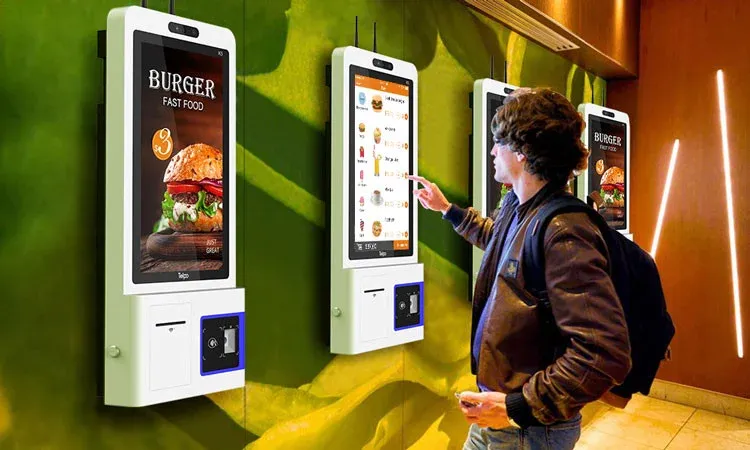
A self-service restaurant is any dining format where guests serve themselves, order for themselves, or both — and pay before they eat. That covers buffets, cafeterias, automats, counter-service fast food, and kiosk or QR ordering.
This guide covers the seven formats and what the data says about whether self-service raises your average check.
What is a self-service restaurant?
A self-service restaurant is a dining establishment where guests perform at least one task normally handled by staff: choosing and plating their own food, placing their own order, or paying without a cashier.
Three things define the format: guests serve or order themselves, payment usually comes before the meal, and there is no table service. Everything from a hotel breakfast buffet to a McDonald's ordering kiosk follows those rules in some way.
Self-service is a category, not a business model, and it sits alongside restaurant types. Most establishments built around it are fast food, quick-service, or fast casual — but it reaches further.
7 types of self-service restaurants
Where a format sits on the spectrum depends on how much food handling the guest does and how much ordering.
Format | How it works | Typical pricing | Where you see it |
|---|---|---|---|
| Guests plate their own food from a service line and return as often as they like | Prix fixe — one price per head | Hotel breakfast, all-you-can-eat, cruise dining |
| Guests move along a line and choose items; staff plate most of them | À la carte, or by weight at the register | School and hospital dining, corporate canteens |
| No staff contact. Guests select, pay, and collect from a machine | À la carte, per item | Break rooms, transit hubs, 24-hour food walls |
| Guests order and pay at a counter, then carry their food to the table | À la carte | Fast food, delis, coffee shops, fast casual |
| Guests order and pay on a touchscreen; the kitchen gets the ticket and calls the number | À la carte, with prompted add-ons | Large QSR chains, airport and stadium units |
| Guests order at a speaker or screen and collect from a window without leaving the car | À la carte | Fast food, coffee, pickup-only lanes |
| Independent vendors under one roof; guests order at each stall and seat themselves | À la carte, per vendor | Urban market halls, industrial conversions |
Buffet and cafeteria get confused most often, and the difference is operational. At a buffet, the guest holds the serving spoon, so portion control is a design problem — you manage cost through what goes on the line. At a cafeteria, staff plate it, so it becomes a training problem. Buffets carry higher waste risk and lower labor; cafeterias, the reverse.
Pricing follows. Prix fixe only works when cheap, high-volume items carry the line. À la carte protects the margin per item but slows it down.
Pricing by weight is fast and self-regulating, and needs a scale wired to your register. Counter service is what most independents adopt — the mechanics are in our guide to counter service restaurants.
Do self-service kiosks actually increase sales?
Kiosk vendors routinely quote a 15–30% lift in average check. None publish a methodology behind it.
The one peer-reviewed field experiment points the other way. Researchers at the University of North Texas ran a field study at a Burger King, randomly assigning 192 diners to order either at a kiosk or with a cashier across peak and off-peak periods. Ordering at the kiosk was measurably faster, and guests preferred it — but it produced lower sales per person than the cashier did.
The upsell, in other words, is a property of the interface, not the hardware. A kiosk that prompts every guest with a relevant add-on beats a cashier who skips it during a rush. One that only digitizes your menu board just moves the queue.
So run the cheap test first. Turn on upsell prompts in whichever channel you already have and measure your own average ticket over four weeks. If add-ons move your numbers there, they will move them on a kiosk too — and you will know what the hardware is actually buying you.
What are the benefits of self-service restaurants?
Each of the four shows up in a different number: covers per hour, labor percentage, comps at the pass, and the share of your guests who will use the channel at all.
Faster service and higher turnover
Self-service removes the order-taking bottleneck. Instead of one cashier serving one guest at a time, several order at once — on a screen, on their phone, or along a buffet line. The same counter handles more covers per hour without adding a person to the till. That shows up as table turnover, not a line item, which is why it gets underestimated.
Lower labor pressure
Self-service is usually sold as a way to cut headcount. In practice, operators redeploy. In the National Restaurant Association's 2026 survey, only 6% of operators said technology investments permanently eliminated jobs. What changes is where people stand: fewer at the till, more on expo, floor, and prep.
Work out your labor cost percentage first, then check which shifts self-service would actually relieve — there are faster ways to reduce labor costs than buying hardware.
Higher order accuracy
Guests entering their own orders removes the two places mistakes happen: hearing the order and typing it in. They check their own modifiers before confirming — fewer remakes, less waste, fewer comps at the pass, and more time for the parts of restaurant service guests remember.
Guest demand is already there
Willingness has stopped being the constraint. In the same survey, 68% of US adults said they would order and pay at a self-service kiosk if a restaurant offered one.
Age group | Would order and pay at a self-service kiosk |
|---|---|
Gen Z | 81% |
Millennials | 78% |
Gen X | 69% |
All adults | 68% |
Boomers | 53% |
If your lunch rush skews under 40, a self-service-first counter is low risk. If half your covers are over 60, keep a staffed lane open. The pattern holds elsewhere: 74% would order through a restaurant's app, 70% through its site.
Where self-service breaks down
Most content on this subject is written by companies selling the equipment, which is why the failure modes rarely get named. Each has a cheap fix.
- You and your guests may not agree this is an improvement. The 2026 survey found 65% of operators believe technology improves the hospitality they deliver, but only 41% of consumers agree — and 48% of Boomers say it detracts. If your regulars skew older, faster service can make your restaurant feel colder.
- Screens fail, and there is rarely a plan B. A kiosk that freezes at 12:40 on a Friday is a closed till. Decide in advance who takes orders manually and where the printed menus live.
- Complex orders still need a person. Allergen questions and substitutions get handled badly by a screen. Keep someone visible near the ordering point whose job is to be asked — and state plainly on that screen what guest data you store.
Accessibility: what ADA requires of a kiosk
A kiosk in a US restaurant falls under the 2010 ADA Standards for Accessible Design. Where a guest approaches head-on with nothing in the way, controls must sit between 15 and 48 inches above the floor, with clear floor space to approach, and operable parts must work with one hand.
Software counts too. In 2017, the American Council of the Blind sued Eatsa, a chain built around tablet ordering, arguing its kiosks and app were unusable for blind customers—and the host at each location staffed to assist did not settle it.
So when you evaluate vendors, ask to see the accessibility mode working, and ask a wheelchair user to reach the button that activates it.
Self-service without buying hardware
Every benefit above — ordering at your own pace, the prompt that never gets skipped, the order landing in the kitchen without being retyped — comes from the software, not the box it runs on.
- QR ordering at the table or counter. Guests scan, order, and pay on a phone they already own.
- Your own branded app. Repeat guests order in two taps, and you keep the customer relationship instead of renting it.
- Ordering directly from your website. The lowest-friction entry point for a first-timer.
Michelangelo 301, a Florida pizza restaurant trading since 1980, took 51% of online orders through its own app in the twelve months to March 2024 — 23,269 orders, $863,166 in direct revenue, $129,474 kept out of third-party commissions.
Not only did we see our sales approach the $1M mark, but the ease of use and efficiency of the mobile app significantly boosted our online orders.
Scale is not the prerequisite. The Wind-Chill Factory, one location in Ticonderoga, New York, runs 52% of orders through its branded app and takes $386,000 a year from direct ordering alone — 9,000 orders, $77,200 in avoided commissions, and a database of 4,234 customers it owns outright.
Every order through a marketplace is an order you don't own. You don't know who the customer is, and you can't bring them back.
Across a study of 1,337 restaurants, launching a branded app produced 87% more orders and 129% more revenue in year one.
Examples of self-service technology in restaurants
Six channels do the work in practice, and only one of them needs a terminal on the floor.
1. QR code menus
Placed on tables, posters, or windows, QR codes let a guest scan, order, and pay from their own phone.
You can use a QR code menu builder to make and share your digital restaurant menu in a few minutes.
2. Self-ordering kiosks
A touchscreen that lets a guest browse, customize, pay, and send the ticket straight to the kitchen.
Kiosks work best where three conditions hold at once: a visible queue at peak, a menu with real customization, and guests comfortable with screens.
Miss one and the terminal is an expensive menu board. An automated ordering system for fast food is table stakes at airports and stadiums, hard to justify at fifty covers.
3. Four more channels worth knowing
- Restaurant mobile app: a branded mobile app carries ordering and your marketing — discounts, promotions, and a loyalty program that gives repeat guests a reason to use your channel, not a marketplace.
- Online ordering systems: UpMenu's commission-free ordering system lets customers order remotely and schedule pickup or delivery directly from your website.
- Contactless payments: shorten checkout, cut cash handling, and remove the last point a queue forms.
- Tableside ordering: lets seated guests order and pay from their phone while servers keep running food — the closest a full-service restaurant gets to self-service.
How to start self-service in your restaurant
The usual failure is buying the hardware first and then finding out the POS won't accept its orders. These five steps put the free tests before the expensive ones.
1. Decide which format your volume supports
A buffet needs enough traffic to keep a hot line turning over. Kiosks need a queue worth removing — below roughly a hundred covers a day, there is no queue, and the terminal is decoration.
Counter service and QR ordering scale to any size, which is why most independents start there.
2. Check what your point of sale can do
This is where most self-service projects stall. Every channel eventually writes an order into your restaurant POS system, and if it cannot, someone retypes tickets all day.
Ask three questions in writing: does your POS accept external orders, is that integration included or billed separately, and what happens when the connection drops?
3. Start with the channel that costs nothing to test
Turn on ordering through your own website or a QR menu first, with the same upsell prompts you would put on a kiosk. Run it for four weeks and compare average ticket and order time against your baseline — you can set up online ordering in an afternoon.
4. Connect the kitchen before you scale
A channel that does not reach the kitchen cleanly just moves the bottleneck from the till to the pass. Orders should arrive on a kitchen display already routed to the right station, modifiers intact.
Test the ugly cases first: three substitutions, an order thirty seconds before close, two identical orders at once. Most of the value attributed to self-service is really end-to-end automation in restaurants.
5. Keep one staffed lane open
Don't convert every ordering point at once, no matter how good the first month looks. Half of older guests will not use a screen, complex orders need a person, and terminals fail. One staffed lane costs a single position and removes all three risks.
About the author

Marketing Manager
Leads UpMenu's marketing and helps restaurants grow. Writes about restaurant marketing, branding, websites, menu design, and opening a restaurant — from pizzerias and food trucks to coffee shops and ghost kitchens. Digital marketer driven by data and AI — for 6+ years working with restaurants.